Why do my devices drift apart?
Every device has its own clock. For all of them to run at the same speed, one sets the tempo, via MIDI clock, Link or analog clock, and the others follow.
Set two phones with a metronome to 120 and start them at the same time. After a minute you hear why it needs sync.
CH 04Tempo, bars, and why sync changes everything›A clock is the shared timekeeper that puts devices on the same tempo.1 min
A clock is the shared timekeeper that puts devices on the same tempo. As soon as more than one is running, that is the difference between together and side by side: twelve loops that are each fine on their own add up to nothing if every one brings its own tempo.
[The hands-on graphic for this is above.]
The three terms
BPM means beats per minute and is the tempo. 120 BPM is two beats per second. A bar is the packaging for those beats, usually four of them. Quantisation means the device pulls your input onto the nearest clean grid so that it does not wobble.
For loops this leads to a hard rule: loop lengths have to fit each other. Four bars and eight bars run together. Four and five drift apart and only meet again after twenty bars.
MIDI clock
One device sets the tempo and sends it as an instruction to all the others. The one giving it is called the master, the receiving ones slaves. From that moment they all run on the same clock, start together and stop together. Worth knowing: a tempo instruction like this has no channel, every device on the cable gets it automatically, whatever channel it otherwise listens on.
Two other routes that do the same thing
- Ableton Link. For everything on the same wifi, so iPads, iPhones and computers. No master, no forced start: everyone agrees on a shared clock, each person starts when they like and still stays on the grid. Built into almost every serious music app, Loopy Pro included.
- CV, meaning control voltage. The older, purely electrical route: one pulse per step, no messages, no addresses. At home mainly in the modular world, more on that in Booklet 2, chapter 20, under Eurorack.
IN THE BOOKLET: CH 04 · OLD VERSION
CH 10How it keeps in step with the rest›The rear panel.1 min
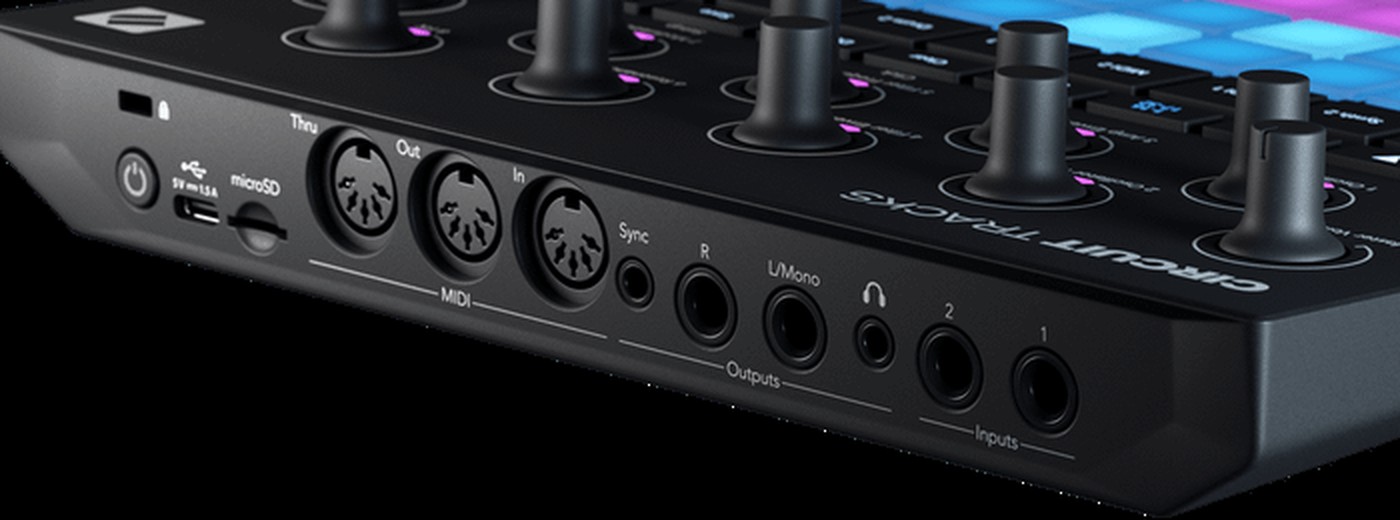
- It has three full-size five-pin sockets: In, Out and Thru. That lets it connect to any other hardware without an adapter. Thru can be switched in the menu to a second Out if you want to chain two devices.
- Next to them sits a 3.5 mm jack for analogue sync. That is not MIDI but a pure clock pulse for older and modular devices that cannot do anything with MIDI.
- It can give or take the clock. In the course one device gives the clock for everyone and the others take it. Who gives is an agreement, not a technical question.
- It also speaks MIDI over USB. With an iPad or computer attached, the same clock can come from there and meet Ableton Link from chapter 04.
IN THE BOOKLET: CH 10 · OLD VERSION